Digital SAT format: sections, timing and adaptive modules
Global TutorsOctober 22, 2026
The SAT is taken digitally, on a laptop or tablet, in College Board's Bluebook app. Students approved for paper-based accommodations are the exception. It has two sections, Reading and Writing and then Math, and each section is split into two timed modules. The test takes 2 hours and 14 minutes, plus a 10-minute break between the sections. The second module of each section adapts to how the student did on the first. This guide explains each part of the digital SAT format using College Board's own pages.
The digital SAT format at a glance
College Board sets out the structure like this:
- Reading and Writing: 54 questions in 64 minutes, as two 32-minute modules.
- Break: 10 minutes between the two sections.
- Math: 44 questions in 70 minutes, as two 35-minute modules.
- Total: 98 questions in 134 minutes (2 hours 14 minutes) of testing.
College Board's specifications give the make-up of each module. A Reading and Writing module has 25 operational questions and 2 pretest questions, and a Math module has 20 operational questions and 2 pretest questions. That gives about 1 minute 11 seconds per Reading and Writing question and about 1 minute 35 seconds per Math question.
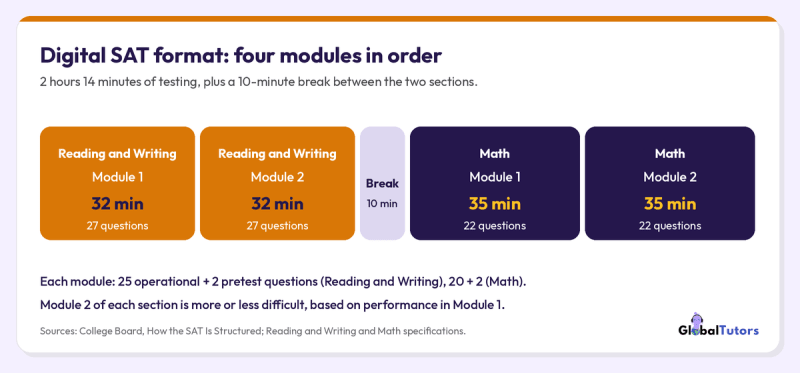
The chart shows the four modules in order, with their timings and question counts.
How the adaptive modules work
College Board describes the adaptive design in one line: "The first module of each section contains a broad mix of easy, medium, and hard questions. Based on how you perform on the first module, the second module of questions will either be more difficult or less difficult."
Within a module, students can move back and forth between questions and review answers until time runs out. "Once you've moved on from a module, you cannot go back to it." Each module is timed separately, and Bluebook keeps track of the time.
What this means for preparation:
- Give the first module of each section full effort, because performance on it decides whether the second module is more or less difficult.
- Use the time inside a module to go back to questions you've marked, since you can't return to a module later.
- Practise on the real adaptive format. Bluebook's full-length practice tests are adaptive.
The Reading and Writing section
Every question comes with a short passage or a pair of passages, and each passage is followed by a single multiple-choice question. Passages range from 25 to 150 words and cover literature, history and social studies, the humanities and science.
The questions fall into four content domains. College Board gives this approximate share of the section for each one:
- Craft and Structure (about 28%): words in context, text structure and purpose, and cross-text connections.
- Information and Ideas (about 26%): central ideas and details, command of evidence (textual and quantitative), and inferences.
- Standard English Conventions (about 26%): boundaries, and form, structure and sense.
- Expression of Ideas (about 20%): rhetorical synthesis and transitions.
Each module includes questions from all four domains. Questions that test similar skills are grouped together and arranged from easiest to hardest.
The Math section
The Math section has four content domains, and questions from all four appear in each module. College Board gives the number of questions for each:
- Algebra: 13 to 15 questions
- Advanced Math: 13 to 15 questions
- Problem-Solving and Data Analysis: 5 to 7 questions
- Geometry and Trigonometry: 5 to 7 questions
Algebra and Advanced Math are each about 35% of the section, and the other two about 15% each. About 30% of Math questions are set in context, as science, social studies or real-world "word" problems. About 75% use the four-option multiple-choice format, and the rest are student-produced responses, where the student types in an answer. Across each module, questions are arranged from easiest to hardest.
Calculators and on-screen tools
A calculator is allowed for the whole Math section. Bluebook has a Desmos calculator built in, and students can switch between its graphing and scientific versions at any point in the Math section. Students can also bring their own approved calculator. A calculator can't be used in the Reading and Writing section.
College Board's calculator policy allows graphing calculators without CAS (computer algebra system) features, scientific calculators and four-function calculators, though it doesn't recommend four-function models. Calculators with CAS functionality are not allowed. If you bring your own, practise with the one you'll use on test day.
Bluebook also gives students:
- A reference sheet on Math questions.
- An annotation tool to highlight text or leave a note on Reading and Writing questions.
- A way to cross out answer options they think are wrong.
- A "mark for review" flag for questions to come back to.
How the digital SAT is scored
The SAT reports a total score from 400 to 1600 and two section scores, Reading and Writing and Math, each from 200 to 800. The score report also shows a score range and percentiles. Its Knowledge and Skills section shows performance in each of the eight content domains, four in each section.
How to prepare for the format
- Download Bluebook early. Practice tests are in the app, and College Board advises starting device preparation at least 30 days before test day.
- Take a full adaptive practice test under timed conditions, then review the correct answers and rationales.
- Learn Desmos or your own approved calculator before test day, not on it.
- Use the domain results from each practice test to choose what to study next.
For more on the test itself, see our SAT and ACT hub. Our pages on SAT Math tutoring and SAT Reading and Writing tutoring cover help for each section. Weighing up the SAT against the ACT? See our ACT vs SAT guide.
FAQ
How long is the digital SAT?
2 hours and 14 minutes of testing: 64 minutes of Reading and Writing and 70 minutes of Math, with a 10-minute break between them.
How many questions are on the digital SAT?
98: 54 in Reading and Writing and 44 in Math.
Is the digital SAT adaptive?
Yes, by module. The second module of each section is more or less difficult depending on how the student did on the first.
Can you use a calculator on the whole SAT?
On the whole Math section, yes, either the built-in Desmos calculator or an approved handheld one. Calculators aren't allowed in Reading and Writing.
Can you go back to earlier questions?
Yes, within the same module, until its time runs out. Once you move on from a module, you can't return to it.
Prepare with an SAT tutor
Our 124 tutors include 16 with examiner, marker or moderator experience, and 51% hold a teaching qualification. We'll match you with a tutor within a day, starting with a free, no-obligation Meet & Greet. There are no long-term contracts.
Find an SAT tutor | SAT Math tutoring | SAT and ACT tutoring
Sources
- College Board, How the SAT Is Structured: https://satsuite.collegeboard.org/sat/whats-on-the-test/structure
- College Board, Reading and Writing specifications: https://satsuite.collegeboard.org/k12-educators/about/alignment/reading
- College Board, Math specifications: https://satsuite.collegeboard.org/k12-educators/about/alignment/math
- College Board, The SAT Reading and Writing section: https://satsuite.collegeboard.org/sat/whats-on-the-test/reading-writing
- College Board, The Math section: overview: https://satsuite.collegeboard.org/sat/whats-on-the-test/math/overview
- College Board, Student-produced responses: https://satsuite.collegeboard.org/sat/whats-on-the-test/math/student-produced
- College Board, What to expect on test day: https://satsuite.collegeboard.org/sat/what-to-bring-do/what-to-expect
- College Board, SAT Suite calculator policy: https://satsuite.collegeboard.org/in-school-assessments/calculator-policy
- College Board, What do my SAT Suite scores mean: https://satsuite.collegeboard.org/sat/scores/understanding-scores
- College Board, Full-length practice tests: https://satsuite.collegeboard.org/practice/practice-tests
- College Board, Bluebook: prepare your device: https://bluebook.collegeboard.org/students/prepare-your-device
Ready to excel in your exams?
Get personalized support from our expert tutors and achieve your academic goals.